AI Headshots: Practical Guide for Individuals

MH
Matthieu van HaperenFounder & CEO, Portreya · Updated Sep 2026

TL;DR: Quick Answer

AI headshots help individuals get a credible professional photo without a studio day.

Judge likeness, natural skin, and thumbnail crop before you publish.

Portreya Starter is $4.99 for 2 photos from one selfie in about 60 seconds per image, one-time, money-back.

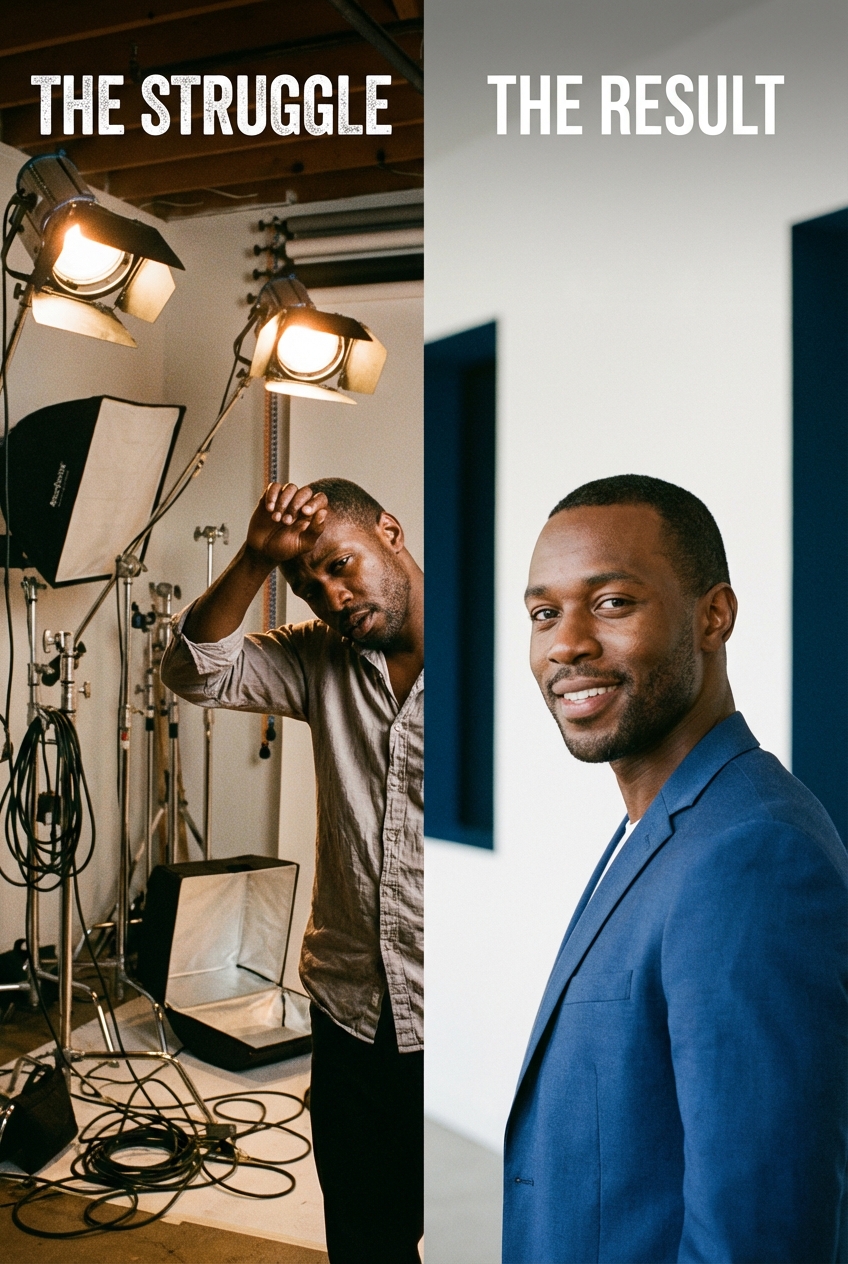
Man in a studio with bright lights and cables, wiping his brow. Next to him, a smiling man in a blue blazer, suitable for ai

AI headshots are professional-looking portraits generated from your photos, often a single clear selfie, so you can update LinkedIn, a job application, or a personal site without booking a studio. They work best when resemblance, natural light, and a clean crop matter more than a documented photoshoot.

This guide is for one person who needs a credible professional image, not a company photo day. With Portreya, Starter is $4.99 for 2 photos, one selfie, about 60 seconds per image, one-time payment, money-back guarantee.

If you need matching photos for a whole company, start with TeamShotsPro company headshots.

What AI headshots actually are

An AI headshot tool turns reference photos of you into polished portrait outputs. The model learns enough of your face to produce new framing, lighting, and wardrobe variations while staying close to your real features.

That is different from a random stock face or a cartoon avatar. The job is not "invent a stranger." The job is "help you look like yourself on a good workday," then give you options you can judge before you publish.

Useful AI headshots share four traits:

  1. Likeness first. Friends and colleagues should recognize you immediately.
  2. Natural skin and eyes. Heavy smoothing and plastic shine break trust.
  3. Simple professional framing. Head and shoulders, eye level, clean crop.
  4. Context fit. LinkedIn, a resume, a speaker page, and a casting card have different standards.
If a result fails those checks, discard it. Volume of options does not matter if none look like you.

Who gets the most value from AI headshots

AI headshots pay off when speed and a credible profile photo matter more than a photographed session:

  • Job seekers refreshing LinkedIn and optional resume photos for markets that expect one
  • Consultants, freelancers, and coaches who need a current face on proposals and sites
  • Founders and operators updating bios without waiting on a studio day
  • Creators and agents who need a clean head-and-shoulders image for directories
  • Anyone remote who cannot easily reach a portrait photographer this week
The common pattern is simple: your face is part of the first impression, and the old photo no longer matches how you show up on video calls.

When AI headshots are the wrong tool

Skip AI (or use it only as a draft) when the photo must document a real session or meet a formal casting/editorial bar:

  • Acting and modeling submissions that require real digitals or agency-shot cards
  • Major press portraits where the outlet expects a photographer credit and a real set
  • Legal or regulatory ID uses that require a controlled capture process
  • Any use where "this was generated" would break trust if discovered later
Honesty is part of professionalism. If the context needs a true photographed session, book one. For a deeper quality debate, read Are AI headshots professional?.

How AI headshots work (without the hype)

Most individual tools follow a short loop:

  1. You upload one or more clear photos of your face.
  2. The system extracts identity cues (structure, hair, expression range).
  3. It generates portrait options with professional lighting and framing.
  4. You pick the frames that still look like you, then download.
Portreya is built around the simplest version of that loop for individuals: one clear selfie, generation in about 60 seconds, and a fixed Starter pack of 2 photos for $4.99 with a one-time payment and money-back guarantee. You do not need a multi-photo training set for the default path.

For a step-by-step technology explainer, see How do AI headshots work?. For the product page that converts, use the AI headshot generator.

AI vs photographer vs DIY phone

PathBest forTypical costTimeTradeoff
Studio photographerCasting, editorial, high-stakes pressOften $150 to $500+ per personDays to scheduleHighest control; highest friction
DIY phoneFree practice and quick social updates$0MinutesLighting and background quality vary a lot
AI (Portreya)LinkedIn, job search, consulting, portfoliosStarter $4.99 for 2 from one selfieabout 60 seconds per imageFast and affordable; still require human judgment on likeness
None of these paths is "cheating" when the output looks like you and fits the context. The mistake is shipping an over-smoothed stranger face, or paying studio rates when you only needed a clean profile update.

Related deep dives:

What makes a good source selfie

AI cannot invent sharp identity from a blurry, backlit, group photo. Before you generate, check:

  • Face first. You alone, centered, facing the camera
  • Even light. Window light or soft indoor light; avoid harsh noon sun and heavy shadows under the eyes
  • Neutral expression options. A natural micro-smile and a calm neutral both help
  • Current look. Same hair length, glasses, facial hair, and age range as today
  • Clean background. Busy rooms confuse framing even when the face is fine
  • No heavy filters. Beauty filters and warped wide-angle selfies hurt likeness
If your only selfie fails those checks, take three new ones in better light. Sixty seconds of capture work usually beats twenty retries on a bad source.

How Portreya works for individuals

Portreya is the individual product path:

  1. Create a free account and open the generator.
  2. Upload one clear selfie.
  3. Generate in about 60 seconds per image.
  4. Review options for likeness, crop, and expression.
  5. Download the frames you will actually use.
Pricing truth (live): Starter is $4.99 for 2 photos, paid once (not a subscription trap), with a money-back guarantee. Higher packs (Essential and Signature) exist when you want more options after you like the quality. Always confirm the pack on the live checkout page before paying.

Portreya is not a free unlimited generator. Free account access lets you start; paid packs unlock the deliverable photos. That is deliberate: quality review beats free-bait spam.

Team or company-wide matching headshots for many employees belong on TeamShotsPro (from $29.99 per seat, 8 photos per seat, minimum 2 seats), not on a one-person selfie flow.
Create a photo you’re proud to share.

Creating your account is free. Choose a paid pack when you’re ready to create your photos.

Create my account

Where people use AI headshots

LinkedIn and professional networks

LinkedIn still rewards a clear face, simple background, and a crop that works as a circle thumbnail. Size and safe-zone rules matter less than "this looks like me." See the dedicated LinkedIn profile picture guide and the profession page for LinkedIn headshots.

Job applications and resumes

In many US contexts a resume photo is optional or discouraged. In other markets a CV photo is expected. If you need one, keep it plain and current. Portreya pairs well with the job application photo guide and the ES foto CV page for Spain and Mexico norms.

Consulting, coaching, and personal sites

A consistent face across your site, proposals, and speaker one-pager builds recognition. Prefer the same expression family so you do not look like three different people across pages.

Company directories and internal profiles

Individuals sometimes need a headshot before HR runs a full team project. Use Portreya for the personal gap; escalate to TeamShotsPro when the whole org needs matching staff photos.

How to choose the final image

Generate options, then judge like a hiring manager with three seconds:

  1. Thumbnail test. Shrink the image. Is the face still clear?
  2. Likeness test. Would a colleague pick you out of a lineup?
  3. Expression test. Natural micro-smile or calm focus beats forced grin and blank stare.
  4. Crop test. Eyes in the upper third; head not cut off; shoulders balanced.
  5. Skin and hair test. Texture should look human, not plastic.
  6. Background test. Soft and simple. No busy shelves competing with your face.
If two frames tie, pick the one that matches the role. Client-facing consultants often prefer approachable warmth. Technical operators often prefer quieter confidence. Neither needs theatrical lighting.

Common mistakes that kill trust

  • Over-smoothing. If skin looks airbrushed beyond recognition, reject it.
  • Wrong age or hair. Outputs that "youth-wash" you or invent a different haircut fail real meetings.
  • Costume wardrobe. Overly formal tux energy for a startup role (or the reverse) creates mismatch.
  • Busy backgrounds. They shrink the face in feeds and look unprofessional.
  • One frame for every context. A keynote banner crop and a LinkedIn circle are different jobs.
  • Hidden pricing. Tools that hide price until the end or force subscriptions for a single photo create buyer regret. Prefer clear packs like Portreya Starter at $4.99.

Cost: what individuals should expect

Studio sessions commonly land between $150 and $500+ per person once you count the shoot, selects, and retouching. DIY is free but often fails on light and background. AI tools range from low fixed packs to expensive multi-pack funnels.

Portreya's individual default is explicit: Starter $4.99 for 2 photos from one selfie in about 60 seconds per image, one-time, money-back. That is enough to replace a stale LinkedIn photo without a studio day. If you need more variety after you like the quality, step up packs on the live site rather than restarting from scratch elsewhere.

Full market ranges live in the professional headshots cost guide.

Privacy and safety basics

Treat any headshot upload like personal biometric-adjacent data:

  • Prefer tools with a clear privacy policy and deletion path
  • Avoid uploading IDs, documents, or photos of other people without consent
  • Do not use a work badge photo you are not allowed to process in third-party tools
  • Download your finals, then remove source uploads if the product supports it
For a short privacy-focused read, see Are AI headshots safe?. Product details always win over marketing claims: read the live policy on the site you use.

Quality checklist before you publish

  • [ ] Looks like you on a normal good day
  • [ ] Eyes sharp, no heavy plastic skin
  • [ ] Crop works as a small circular avatar
  • [ ] Background is simple and secondary
  • [ ] Clothing matches the role and industry
  • [ ] Same face family across LinkedIn, site, and proposals
  • [ ] You would not be embarrassed if someone asks how it was made
If any box fails, generate again or book a photographer for that use case.

How AI headshots fit a broader professional photo system

Think in layers:

  1. Hero headshot for LinkedIn and bio pages (this guide)
  2. Context variants for job apps, speaker pages, or lighter business-casual roles
  3. Examples library when you need style inspiration: headshot examples
  4. Pose and framing practice via headshot poses
  5. Team path only when multiple employees need matching photos on a deadline
You do not need twelve images on day one. One honest, current headshot beats a folder of near-duplicates.

Next step

If you need an individual professional photo this week:

  1. Take one clear selfie in soft light.
  2. Open the AI headshot generator.
  3. Start with Portreya Starter at $4.99 for 2 photos, about 60 seconds per image, one-time, money-back.
  4. Pick the frame that passes the likeness and thumbnail tests.
  5. Update LinkedIn first, then mirror the same face on your site and proposals.
If you are outfitting a whole company instead of one profile, switch to TeamShotsPro for multi-seat team delivery.

Frequently Asked Questions

What are AI headshots?+

AI headshots are professional-style portraits generated from your photos. Good tools keep your likeness and give you usable options for LinkedIn, job search, and personal branding without a studio booking.

Are AI headshots good enough for LinkedIn?+

Yes, when the result looks like you, follows normal professional norms, and is not obviously over-edited. Many people already use quality AI headshots on LinkedIn and company directories.

How many photos do I need to upload?+

It depends on the tool. Portreya is designed for one clear selfie on the individual path. More reference photos can help other systems, but they are not required for Portreya default flow.

How long do AI headshots take?+

Portreya targets about 60 seconds per image from a good selfie to generated options. Studio sessions take longer once you count scheduling, travel, and selects.

How much do AI headshots cost?+

Prices vary widely. Portreya Starter is $4.99 for 2 photos, one-time, with a money-back guarantee. Studio sessions often cost $150 to $500+ per person.

Will people know my headshot is AI?+

If likeness and skin texture look natural, most viewers will not care how it was produced. If the face looks plastic or unlike you, they will notice the quality problem.

Can I use an AI headshot on a resume?+

In markets where resume photos are normal, yes, if the crop is plain and current. In many US applications a photo is optional. Follow the norms of the country and employer.

What if I need headshots for my whole team?+

Use a team product. TeamShotsPro is built for multi-seat company rollouts (from $29.99 per seat, 8 photos per seat, minimum 2 seats). Portreya stays focused on the individual path.

A few minutesper generated photo

Ready to get started with Portreya?

Creating your account is free. Choose a paid pack when you’re ready to create your photos.

Create my account
Matthieu van Haperen

About the Author

Founder & CEO, Portreya

Matthieu van Haperen runs Portreya, where he helps individuals turn casual selfies into professional AI headshots. Before founding Portreya, he spent 6+ years building and scaling tech startups. He writes about professional photography, personal branding, and how AI is changing online portraits.

Connect on LinkedIn