Virtual try-on Chrome extension: see clothes on you before you buy
See the outfit on yourself before you buy it
Product photos show the garment on a model who is not you. Create a free account. Generating a try-on needs Try-On (USD 27.49 for 10 photos, one-time, 14-day money-back guarantee). Studio includes it. 1 Pack does not. Generation takes about a minute per photo.
Free extension. Generating a try-on uses Try-On (USD 27.49 for 10 photos, one-time, 14-day money-back guarantee).
Previews are AI-generated and show the overall look. They do not predict exact sizing, fabric, colour, or drape.
What the flow actually looks like
Step 1
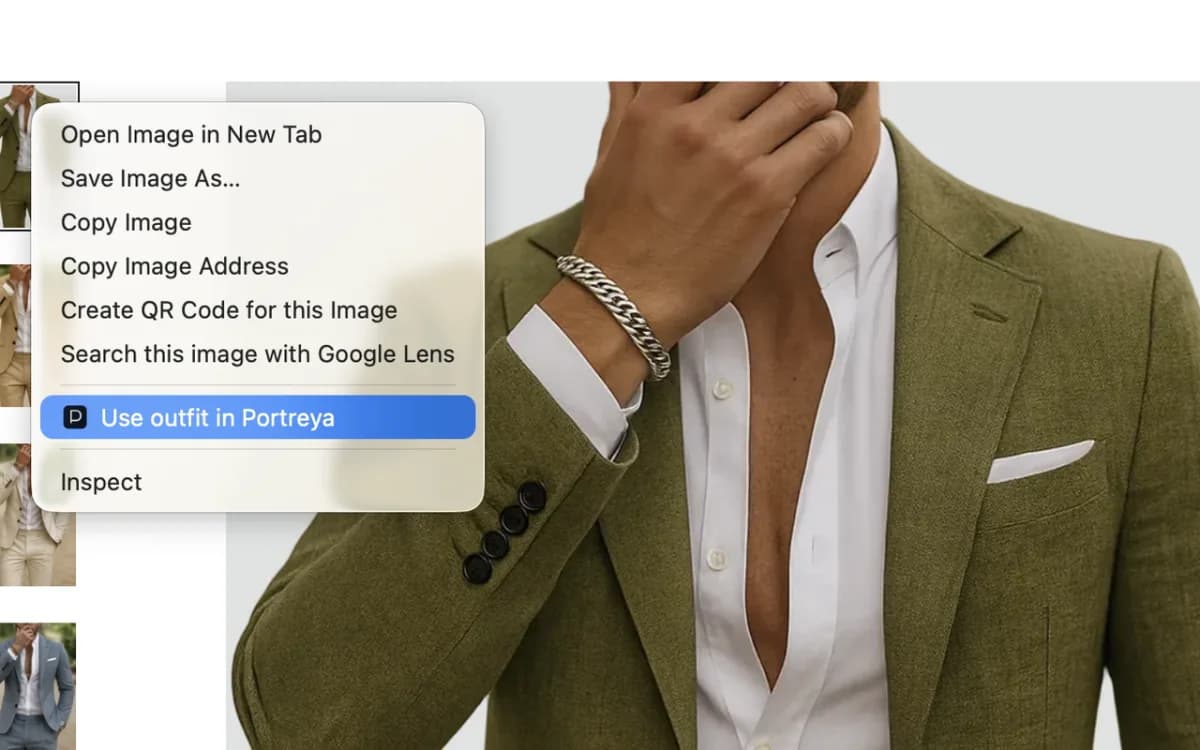
Right-click any outfit image and choose “Use outfit in Portreya”.
Step 2
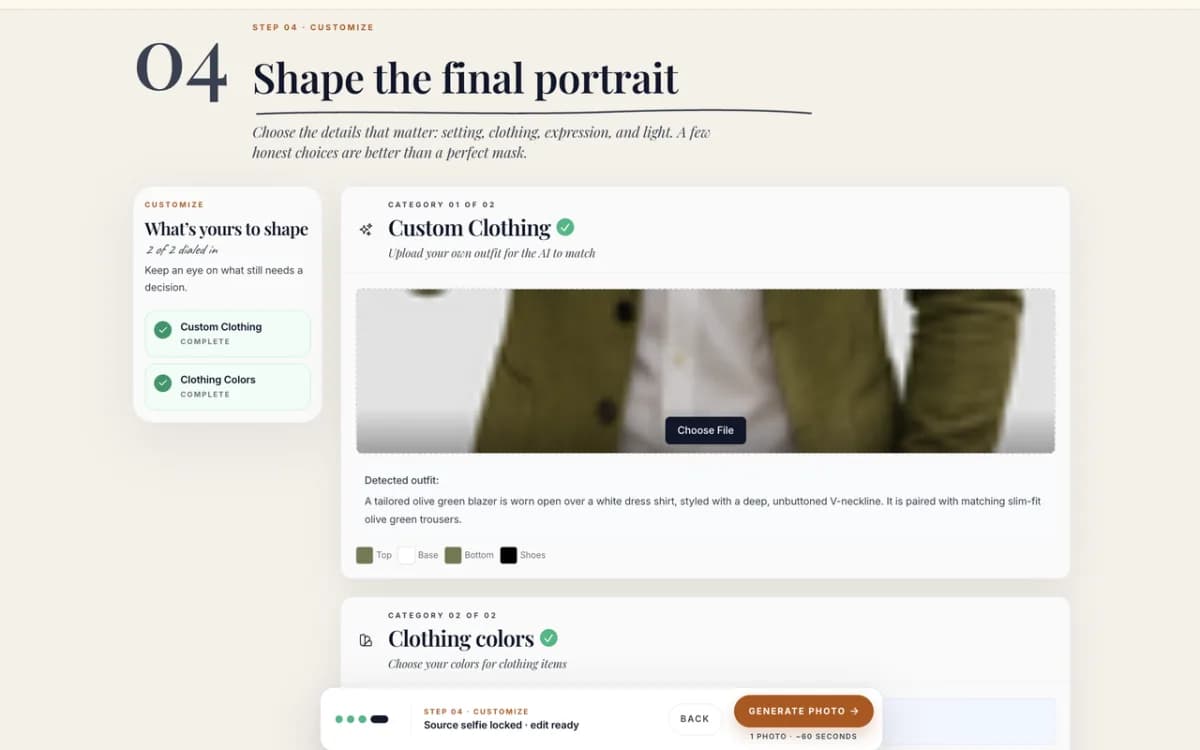
Portreya opens with that garment already loaded, alongside your usual background, pose and framing choices.
Step 3
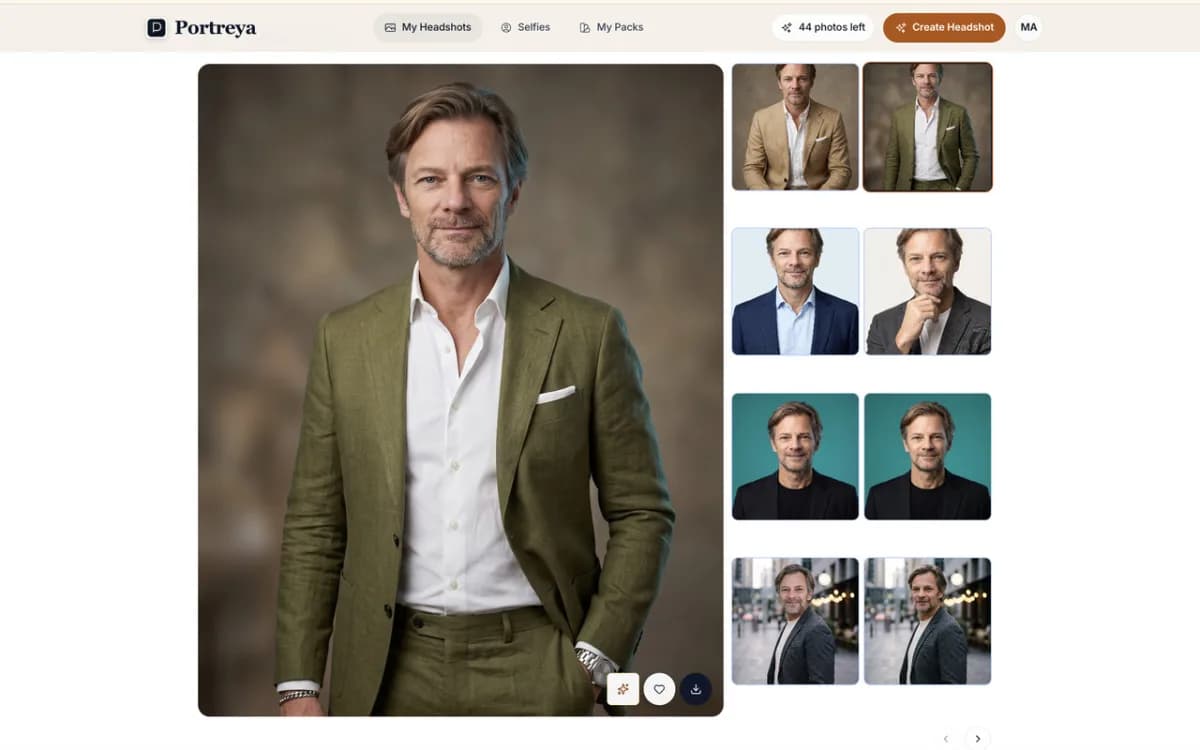
You get a photo of yourself in that outfit, not a model wearing it.
How it works
Connect it once. After that, every try-on takes three steps: right-click, adjust, and generate. No setup to repeat on the next shop.
Install the extension and connect it to your Portreya account once.
Right-click an outfit image on a store, a lookbook, or a social post.
Portreya opens with the garment loaded into the virtual try-on pack.
Pick one clear selfie, adjust the rest, and generate.
Save an outfit from any store and try it on
Spotted something you like? Right-click the product image and choose "Use outfit in Portreya". Portreya opens with that outfit already loaded, ready to try on your own photo. It works on almost any HTTPS store, lookbook or social post, so you can collect outfits from different shops and compare them side by side on the same face.
What it is good for
The useful question when shopping online is rarely “does this garment look good?” but “does it look good on me?” This gives you a look at that before you order. It is a styling preview, not a fit or sizing check.
Seeing how a jacket, blazer or shirt reads against your own colouring and style.
Comparing two options from different shops side by side on the same face.
Planning an interview or event outfit before committing to the purchase.
Turning something you saw in a post into a photo of you wearing it.
What it does not do
The extension has one job and stays idle the rest of the time. It is built so the permissions it asks for are the ones a single right-click genuinely needs.
It does not run in the background or read pages you have not acted on.
It does not collect browsing history, and never uses page URLs for analytics.
The address of the image you picked stays in protected session storage for up to ten minutes so a failed capture can be retried, then it is gone.
Only the bytes of the image you chose are uploaded, over HTTPS, to your own account.
What you need first
The extension is the capture step. Everything else happens in the Portreya web app, where your selfies and captured outfits live.
A Portreya account, which is free to create.
One clear, recent selfie. You do not need a studio photo or a large upload set.
Try-On, which includes the virtual try-on pack. Generating photos is paid: Try-On is USD 27.49 for 10 photos, one-time, 14-day money-back guarantee. 1 Pack does not include virtual try-on. Generation takes about a minute per photo.
Google Chrome, on desktop. The capture menu is a Chrome extension.
The extension interface is currently English only. Portreya itself continues in Spanish.
No. It generates an AI preview of the overall look: the garment, its colour and shape, on your own face and body. It does not measure you, and it cannot tell you whether a size M will fit, how the fabric falls, or how the colour looks under shop lighting. Use it to decide whether a piece suits your style, then use the shop’s own size guide for sizing.
Which shops does it work on?
Any HTTPS page with a visible clothing image, which covers the large retailers and most independent shops, plus lookbooks and social posts. It reads the one image you right-click, so it does not depend on a shop-specific integration. If a site blocks the image from being fetched, the extension says so and you can save the image and upload it in the web app instead.
Is the extension free?
The extension itself is free, and creating a Portreya account is free. Generating a try-on needs the Try-On plan or higher. It is not included with 1 Pack. Try-On is USD 27.49 for 10 photos, one-time, 14-day money-back guarantee. Generation takes about a minute per photo.
How much does a virtual try-on generation cost?
Virtual try-on is included with Try-On: USD 27.49 for 10 photos as a one-time payment. Studio includes it too. 1 Pack does not. Generation takes about a minute per photo.
Can it see the other pages I have open?
No. It does nothing until you explicitly right-click an image and choose the Portreya item. It does not scrape pages, run in the background, or read unrelated browsing activity, and it never sends page URLs to Portreya.
Does the result actually look like me?
It is generated from your selfie, so the face is yours rather than a model wearing the item. The garment is reproduced from the image you captured, so a clear, well-lit product photo gives a closer match than a small thumbnail or a heavily styled editorial shot.
How do I remove it?
Disconnect from the extension popup, which revokes its access to your account, then remove it from Chrome like any other extension. Photos and outfits already in your Portreya account stay there and are handled under the normal account and privacy policy.
How many photos do I need?
One clear, recent selfie is enough to start. You can add more source photos, but you do not need a studio photo or a large upload set.
Can I create a free account?
Yes. You can create a free account, upload one clear selfie, and choose a paid pack when you are ready to generate finished headshots.
How much does a paid package cost?
One-time paid packs (no subscription): 1 Pack USD 5.99 for 2 photos, Try-On USD 27.49 for 10, Studio USD 34.99 for 15. Generated photos are yours to keep for professional profile use. See pricing for the live ladder.
Which browsers does the extension work on?
Portreya Outfit Capture is built for desktop Chrome. Install it from the Chrome Web Store, then connect it to your Portreya account once.
Try an outfit on your own photo
Create your free account, add one clear selfie, and capture the first outfit that catches your eye. Virtual try-on is included with Try-On: USD 27.49 for 10 photos, one-time, 14-day money-back guarantee. Generation takes about a minute per photo.